
[spring] 스프링부트 프로젝트 템플릿1(mybatis-jsp-h2)
🦥 스프링부트 프로젝트 템플릿 만들어보기
[1] 프로젝트 생성
- spring-boot maven 프로젝트 생성
- pom.xml 은 아래와 같이 의존성 추가
- mybatis + jsp + h2
<?xml version="1.0" encoding="UTF-8"?>
<project xmlns="http://maven.apache.org/POM/4.0.0" xmlns:xsi="http://www.w3.org/2001/XMLSchema-instance"
	xsi:schemaLocation="http://maven.apache.org/POM/4.0.0 https://maven.apache.org/xsd/maven-4.0.0.xsd">
	<modelVersion>4.0.0</modelVersion>
	<parent>
		<groupId>org.springframework.boot</groupId>
		<artifactId>spring-boot-starter-parent</artifactId>
		<version>2.3.5.RELEASE</version>
		<relativePath/> <!-- lookup parent from repository -->
	</parent>
	<groupId>com.sk</groupId>
	<artifactId>springboot-mybatis-jsp</artifactId>
	<version>0.0.1-SNAPSHOT</version>
	<name>study</name>
	<description>springboot + mybatis + jsp + h2</description>
	<properties>
		<java.version>1.8</java.version>
	</properties>
	<dependencies>
		<dependency>
			<groupId>org.springframework.boot</groupId>
			<artifactId>spring-boot-starter-web</artifactId>
		</dependency>
		<dependency>
			<groupId>org.mybatis.spring.boot</groupId>
			<artifactId>mybatis-spring-boot-starter</artifactId>
			<version>2.2.2</version>
		</dependency>
		<dependency>
			<groupId>org.springframework.boot</groupId>
			<artifactId>spring-boot-devtools</artifactId>
			<scope>runtime</scope>
			<optional>true</optional>
		</dependency>
		<dependency>
			<groupId>com.h2database</groupId>
			<artifactId>h2</artifactId>
			<scope>runtime</scope>
		</dependency>
		<dependency>
			<groupId>org.projectlombok</groupId>
			<artifactId>lombok</artifactId>
			<optional>true</optional>
		</dependency>
		<dependency>
			<groupId>org.springframework.boot</groupId>
			<artifactId>spring-boot-starter-test</artifactId>
			<scope>test</scope>
		</dependency>
		<!-- jsp -->
		<dependency>
			<groupId>org.apache.tomcat.embed</groupId>
			<artifactId>tomcat-embed-jasper</artifactId>
		</dependency>
		<dependency>
			<groupId>javax.servlet</groupId>
			<artifactId>jstl</artifactId>
		</dependency>
	</dependencies>
	<build>
		<plugins>
			<plugin>
				<groupId>org.springframework.boot</groupId>
				<artifactId>spring-boot-maven-plugin</artifactId>
				<configuration>
					<excludes>
						<exclude>
							<groupId>org.projectlombok</groupId>
							<artifactId>lombok</artifactId>
						</exclude>
					</excludes>
				</configuration>
			</plugin>
		</plugins>
	</build>
</project>
- src/main/resources 하위에 application.properties 파일을 생성한다.
- src/main/ 하위에 webapp 디렉토리를 생성하고, 그 하위에 WEB-INF 디렉토리를 만든다.
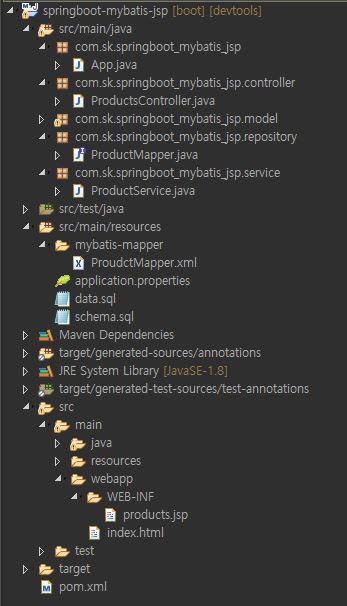
- 어플리케이션 실행을 위한 App.java 를 생성한다.
- @MapperScan을 사용하면, 기준 클래스 하위 인터페이스를 모두 mybatis mapper로 등록한다.
- @MapperScan을 사용하지 않으려면 mapper 인터페이스에 각각 @Mapper 어노테이션을 달아준다.
package com.sk.springboot_mybatis_jsp;

import org.mybatis.spring.annotation.MapperScan;
import org.springframework.boot.SpringApplication;
import org.springframework.boot.autoconfigure.SpringBootApplication;


@MapperScan(basePackageClasses = App.class)
@SpringBootApplication
public class App
{
    public static void main( String[] args )
    {
        SpringApplication.run(App.class, args);
    }
}
- 데이터 도메인 모델을 생성한다.
- 롬복을 사용하여 소스코드량을 줄인다.
package com.sk.springboot_mybatis_jsp.model;

import lombok.Getter;
import lombok.NoArgsConstructor;
import lombok.NonNull;
import lombok.RequiredArgsConstructor;
import lombok.Setter;
import lombok.ToString;

@NoArgsConstructor
@RequiredArgsConstructor
@Getter
@Setter
@ToString
public class Product {

    private Long prodId;
    @NonNull private String prodName;
    @NonNull private int prodPrice;
}
- mybatis의 mapper 인터페이스를 생성한다.
- @MapperScan을 사용하지 않으면, @Mapper를 클래스에 선언해주어야 한다.
package com.sk.springboot_mybatis_jsp.repository;

import java.util.List;

import org.apache.ibatis.annotations.Mapper;
import com.sk.springboot_mybatis_jsp.model.Product;

@Mapper
public interface ProductMapper {

    Product selectProductById(Long id);
    List<Product> selectAllProducts();
    void insertProduct(Product product);
}
- src/main/resources 하위에 mybatis-mapper 디렉토리를 생성 후,(설정)
- mapper 인터페이스에 해당하는 xml 을 생성한다.
<?xml version="1.0" encoding="UTF-8"?>

<!DOCTYPE mapper PUBLIC "-//mybatis.org//DTD Mapper 3.0//EN"
        "http://mybatis.org/dtd/mybatis-3-mapper.dtd">

<mapper namespace="com.sk.springboot_mybatis_jsp.repository.ProductMapper">

    <select id="selectProductById" resultType="Product">
        SELECT prod_id
        ,prod_name
        ,prod_price
        FROM products
        WHERE prod_id = #{prodId}
    </select>

    <select id="selectAllProducts" resultType="Product">
        SELECT prod_id
        ,prod_name
        ,prod_price
        FROM products
    </select>

    <insert id="insertProduct" parameterType="Product">
        INSERT INTO products (prod_name, prod_price)
        VALUES (#{prodName}, #{prodPrice})
    </insert>

</mapper>
- 비즈니스 로직이 구현될 Service 를 생성한다.
 package com.sk.springboot_mybatis_jsp.service;

import java.util.List;

import org.springframework.beans.factory.annotation.Autowired;
import org.springframework.stereotype.Service;
import org.springframework.transaction.annotation.Transactional;

import com.sk.springboot_mybatis_jsp.model.Product;
import com.sk.springboot_mybatis_jsp.repository.ProductMapper;

@Service
public class ProductService {
    @Autowired
    private ProductMapper productMapper;

    public Product getProductById(Long id) {
        return productMapper.selectProductById(id);
    }

    public List<Product> getAllProducts() {
        return productMapper.selectAllProducts();
    }

    @Transactional
    public void addProduct(Product product) {
        productMapper.insertProduct(product);
    }
}
- 웹 요청을 처리할 controller 를 생성한다.
package com.sk.springboot_mybatis_jsp.controller;

import java.util.List;

import org.springframework.beans.factory.annotation.Autowired;
import org.springframework.stereotype.Controller;
import org.springframework.ui.Model;
import org.springframework.web.bind.annotation.GetMapping;
import org.springframework.web.bind.annotation.RequestMapping;

import com.sk.springboot_mybatis_jsp.model.Product;
import com.sk.springboot_mybatis_jsp.service.ProductService;

@Controller
@RequestMapping("/app")
public class ProductsController {

    @Autowired
    ProductService productService;

    @GetMapping("/products")
    public String test(Model model) {
        List<Product> list = productService.getAllProducts();
        model.addAttribute("products", list);
        return "products";
    }
}
- products.jsp 파일을 생성한다.
<%@ page contentType="text/html;charset=UTF-8" language="java"%>
<%@ taglib prefix="c" uri="http://java.sun.com/jsp/jstl/core"%>
<html>
<head>
<meta charset="UTF-8">
<title>Title</title>
</head>
<body>
	<a href="/index.html">메인</a>
	<table>
		<thead>
			<th>prodId</th>
			<th>prodName</th>
			<th>prodPrice</th>
		</thead>
		<tbody>
			<c:forEach var="item" items="${products}">
				<tr>
					<td>${item.prodId}</td>
					<td>${item.prodName}</td>
					<td>${item.prodPrice}</td>
				</tr>
			</c:forEach>
		</tbody>
	</table>
</body>
</html>
프로퍼티 설정
- jdbc:h2:mem:mybatis-test 로 하면 H2를 메모리 방식으로 사용하게 됨
# DataSource
spring.datasource.url=jdbc:h2:mem:mybatis-test
spring.datasource.username=sa
spring.datasource.password=

spring.datasource.hikari.maximum-pool-size=4

# MyBatis
# mapper.xml 위치 지정
mybatis.mapper-locations: mybatis-mapper/**/*.xml

# model 프로퍼티 camel case 설정
mybatis.configuration.map-underscore-to-camel-case=true

# 패키지 명을 생략할 수 있도록 alias 설정
mybatis.type-aliases-package=com.sk.springboot_mybatis_jsp.model

# mapper 로그레벨 설정
logging.level.com.sk.study.repository=TRACE

# jsp 경로
spring.mvc.view.prefix=/WEB-INF/
spring.mvc.view.suffix=.jsp
- 스프링부트에서는 DB 초기화 스크립트를 아래와 같이 편리하에 사용할수 있다.
- src/main/resources 하위에 schema.sql 과 data.sql 을 생성한다.
  DROP TABLE IF EXISTS Products;

CREATE TABLE Products
(
    prod_id     IDENTITY        PRIMARY KEY,
    prod_name   VARCHAR(255)    NOT NULL,
    prod_price  INT             NOT NULL
);

INSERT INTO Products (prod_name, prod_price) values ('베베숲 물티슈', 2700);
INSERT INTO Products (prod_name, prod_price) values ('여름 토퍼', 35180);
INSERT INTO Products (prod_name, prod_price) values ('페이크 삭스', 860);
INSERT INTO Products (prod_name, prod_price) values ('우산', 2900);
Leave a comment